AI Academic Search / 2026

How to choose an AI academic search tool in 2026

Start with database coverage and access to the original paper. Then assess screening, export, and downstream organization. The comparison below applies one set of fields to four common tool types and provides an executable search workflow.

Selection fields for four types of tools

Features change between versions. Before adopting a tool, test its search results and export format with your own research topic.

ToolBest suited forResult organizationFull-text accessCitation exportWork after searching
Google ScholarBroad searches by title, author, and citation relationshipsSorted by relevance or dateLinks to publishers, institutional repositories, or author pagesExports common citation formatsRequires a separate screening table and reading notes
Semantic ScholarDiscovering related papers and reviewing paper summaries quicklyProvides related-paper and citation relationshipsLinks to an open version when one is availableExports citation informationRequires separate organization for writing materials
ElicitSearching around a research question and extracting paper information in bulkCompares papers using custom fieldsRetains source information for resultsExports search and extraction resultsSupports continued screening and evidence organization
AcadwriteContinuing from search to close reading, review writing, and citation completionOrganizes results by research subtopicEach literature record links to a source page for verificationCitations can continue into the manuscriptSearch results remain in the same workspace for further processing
Selection criteria

Check six points before choosing a tool

Confirm source coverage first

Check which databases the tool searches, then whether results retain titles, authors, years, journals, and links to original papers.

Group results by subtopic

Topic groups help reveal research directions. A systematic review still needs the complete query, screening criteria, and reasons for exclusion.

Inspect bulk-extraction fields

Prioritize the research population, sample, methods, measures, main conclusions, and limitations. Return to the original paper when fields are missing.

Check citation export

Confirm whether the tool exports BibTeX, RIS, or other common formats. Verify authors, title, year, and DOI after export.

Save the search record

Record databases, search dates, keywords, screening criteria, and included papers so later updates can identify new results.

Separate discovery from verification

Use generated summaries for initial screening. Verify methods, data, and conclusions against the original paper.

Four steps from search to citation

STEP 1

Enter the research direction

State the research population, core variables, method, or application. Prepare keywords in relevant languages and common synonyms.

STEP 2

Review topic groups

Read titles and abstracts first. Mark items as include, uncertain, or exclude based on relevance, study type, and date range.

STEP 3

Extract comparison fields

For included papers, record the research question, sample, method, measures, conclusions, and limitations. Every field should be traceable to the original paper.

STEP 4

Verify and export citations

Confirm that each paper exists, supports the claim, and has complete bibliographic data. Only then export it to a reference manager or manuscript.

How Acadwrite continues the work

Use Acadwrite to turn search results into reading, reviews, and citations

Acadwrite keeps search results, reading notes, and drafts in one workspace. The research assistant answers questions from materials you have added, so you can compare papers, write a review, and verify citations without moving between disconnected tools.

  • Search real academic literature and open every source for verification
  • Group results automatically by subtopic before close reading
  • Organize literature in the workspace using consistent research fields
  • Match citations to the manuscript and complete formatted references
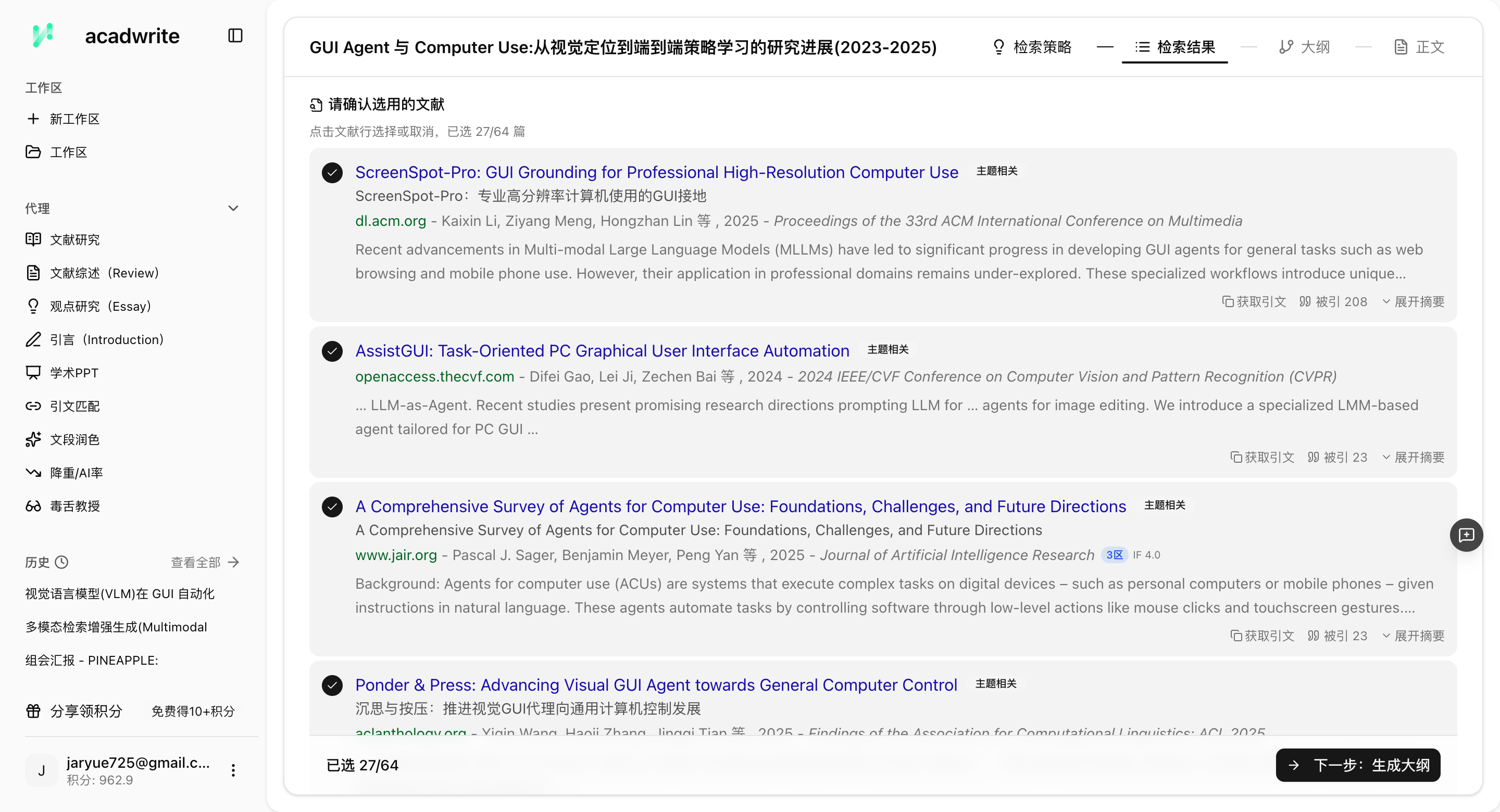
Titles, authors, publication years, and source fields in academic search results

Frequently asked questions

Can AI academic search miss important papers?

A single search entry point can miss literature. Prepare at least three keyword sets covering relevant languages and synonyms. For key papers, also inspect their references and citing papers.

What if foreign-language papers are difficult to read?

First assess relevance from the title and abstract. Record the research question, methods, and conclusions for included papers. Only papers that directly support the current task require full-text close reading.

Is AI academic search free?

Free allowances vary and may change. When choosing a tool, check charges for search volume, full-text processing, result export, and team collaboration.

How does Acadwrite support AI academic search?

Acadwrite puts literature search, topic grouping, paper reading, and manuscript editing in one workspace. Search results can continue directly into review writing and citation verification.

Start with one real search

Use your own research question to check relevance, full-text access, and export fields. One practical search reveals more about suitability than a list of feature names.